> For the complete documentation index, see [llms.txt](https://platform9.com/kb/llms.txt). Markdown versions of documentation pages are available by appending `.md` to page URLs; this page is available as [Markdown](https://platform9.com/kb/generic/frequently-asked-questions/troubleshooting-ui-failing-to-load-or-loading-slowly.md).

# Platform9 U/I Failing to Load or Loading Slowly

## Problem

Platform9 U/I is failing to load certain pages and/or loading very slowly.

## Environment

* Platform9 Managed Services
* U/I

## Procedure

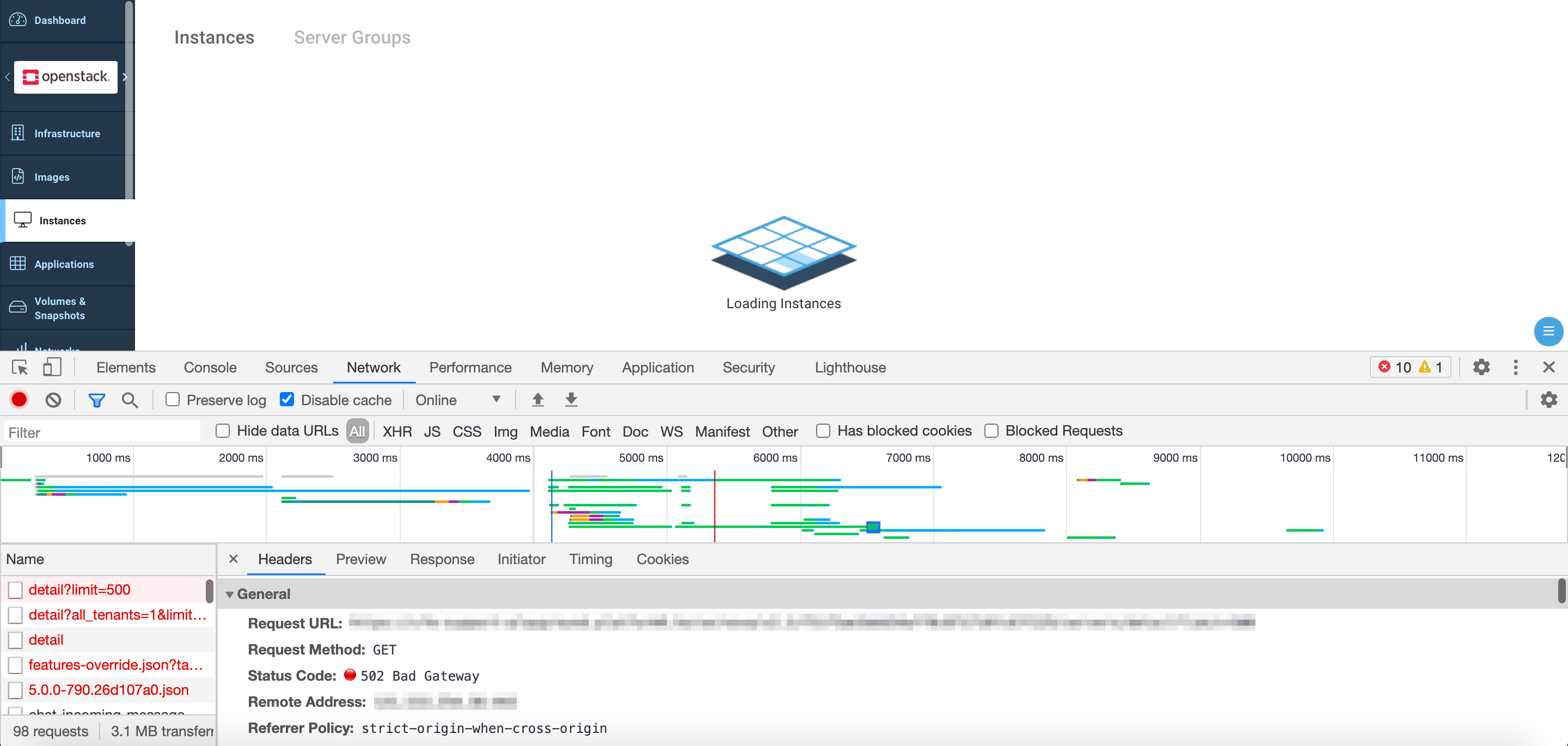
1. Logout of the UI, and/or ensure you are on the login screen.

<figure><img src="https://3182346597-files.gitbook.io/~/files/v0/b/gitbook-x-prod.appspot.com/o/spaces%2FQM0xDokARgDhhtesMRUM%2Fuploads%2Fgit-blob-f492f84c9004d21d4cfaa812b867a852c0dfd91c%2F1623345554.png?alt=media" alt="Screen_Shot_2021-02-12_at_1.07.44_PM.png"><figcaption><p>Screen_Shot_2021-02-12_at_1.07.44_PM.png</p></figcaption></figure>

2. Enable Developer Tools in your browser.

### Chrome

**Keyboard Shortcut**: ⌘ (CMD) + ⌥ (OPTION) + I

**Settings**: More Tools > Developer Tools

3. Select the Network tab.
4. Ensure that the "Disable Cache" option is checked and reload the page.
5. Sign in to Clarity UI with your credentials – ensuring that the Developer/Network tools are still visible.

<figure><img src="https://3182346597-files.gitbook.io/~/files/v0/b/gitbook-x-prod.appspot.com/o/spaces%2FQM0xDokARgDhhtesMRUM%2Fuploads%2Fgit-blob-3407dce54f5f2d53323032750c6466635f352d9d%2F1623345556.png?alt=media" alt="Screen_Shot_2021-02-12_at_2_17_45_PM.png"><figcaption><p>Screen_Shot_2021-02-12_at_2_17_45_PM.png</p></figcaption></figure>

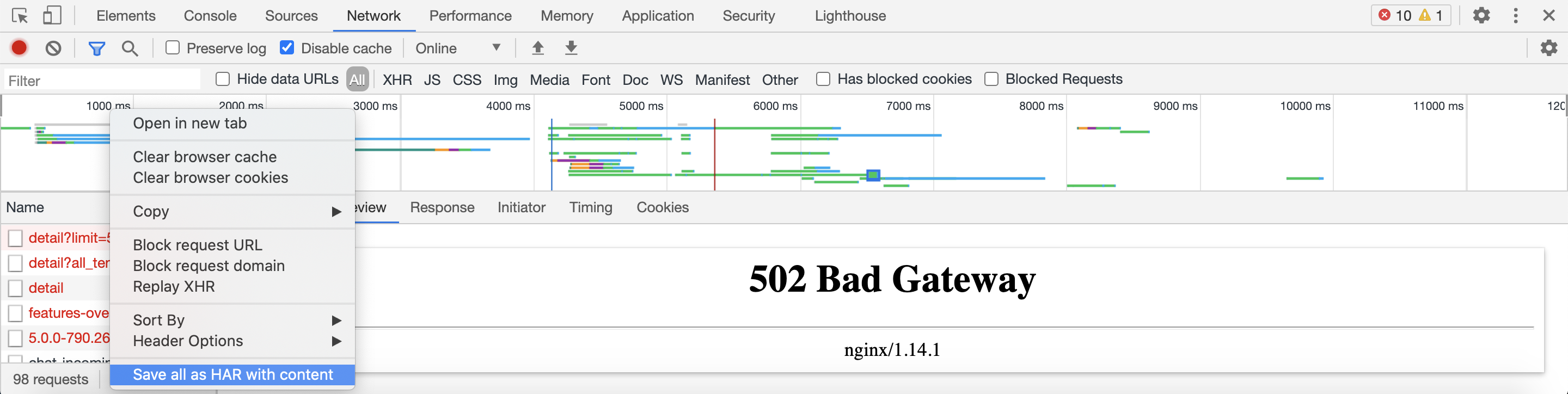
6. When navigating to any page upon login – are any requests failing? In other words, are any requests getting a non-HTTP 2xx response code?

**Hint**: Sort by "Status" in descending order by clicking on the labeled column.

An example is included below where it can be observed that the "Instances" tab is failing to load due to various failed HTTP 502 (Bad Gateway) responses.

<figure><img src="https://3182346597-files.gitbook.io/~/files/v0/b/gitbook-x-prod.appspot.com/o/spaces%2FQM0xDokARgDhhtesMRUM%2Fuploads%2Fgit-blob-8c2413ff67c9aef428c6002389897a84073f8b5a%2F1623345561.png?alt=media" alt="Screen_Shot_2021-02-12_at_2.26.07_PM.png"><figcaption><p>Screen_Shot_2021-02-12_at_2.26.07_PM.png</p></figcaption></figure>

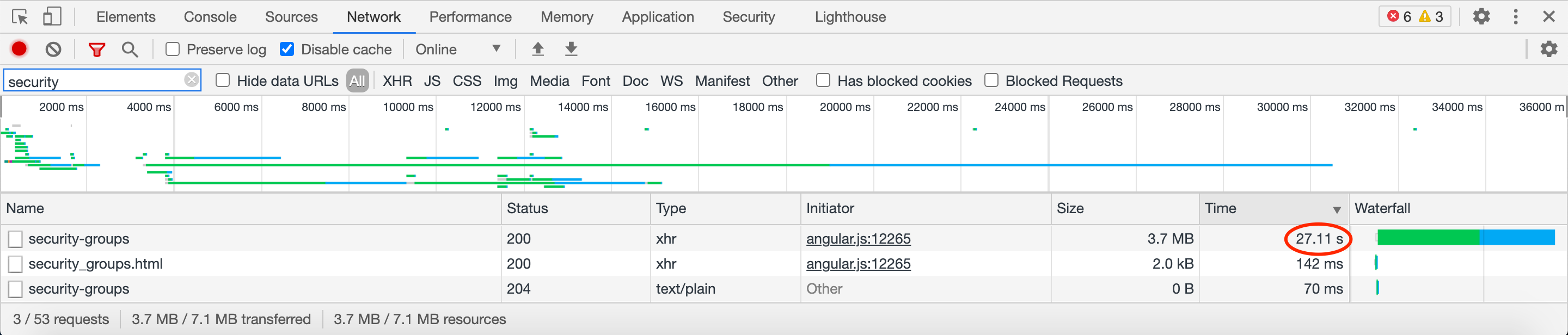
To gain more detail about these requests, click on each of the request names, e.g. "detail".

<figure><img src="https://3182346597-files.gitbook.io/~/files/v0/b/gitbook-x-prod.appspot.com/o/spaces%2FQM0xDokARgDhhtesMRUM%2Fuploads%2Fgit-blob-a1fbaa02c32c554f0a05bc4e5f59d491da05f850%2F1623345566.png?alt=media" alt="Screen_Shot_2021-02-12_at_2_26_31_PM.png"><figcaption><p>Screen_Shot_2021-02-12_at_2_26_31_PM.png</p></figcaption></figure>

7. Right click on the request name and select "Save all as HAR with content".

<figure><img src="https://3182346597-files.gitbook.io/~/files/v0/b/gitbook-x-prod.appspot.com/o/spaces%2FQM0xDokARgDhhtesMRUM%2Fuploads%2Fgit-blob-211b2d4bf86cc46b14df17fda7fad246b5c65806%2F1623345570.png?alt=media" alt="Screen_Shot_2021-02-12_at_2.27.10_PM.png"><figcaption><p>Screen_Shot_2021-02-12_at_2.27.10_PM.png</p></figcaption></figure>

8. Attach the file to a Platform9 Support ticket for further analysis.
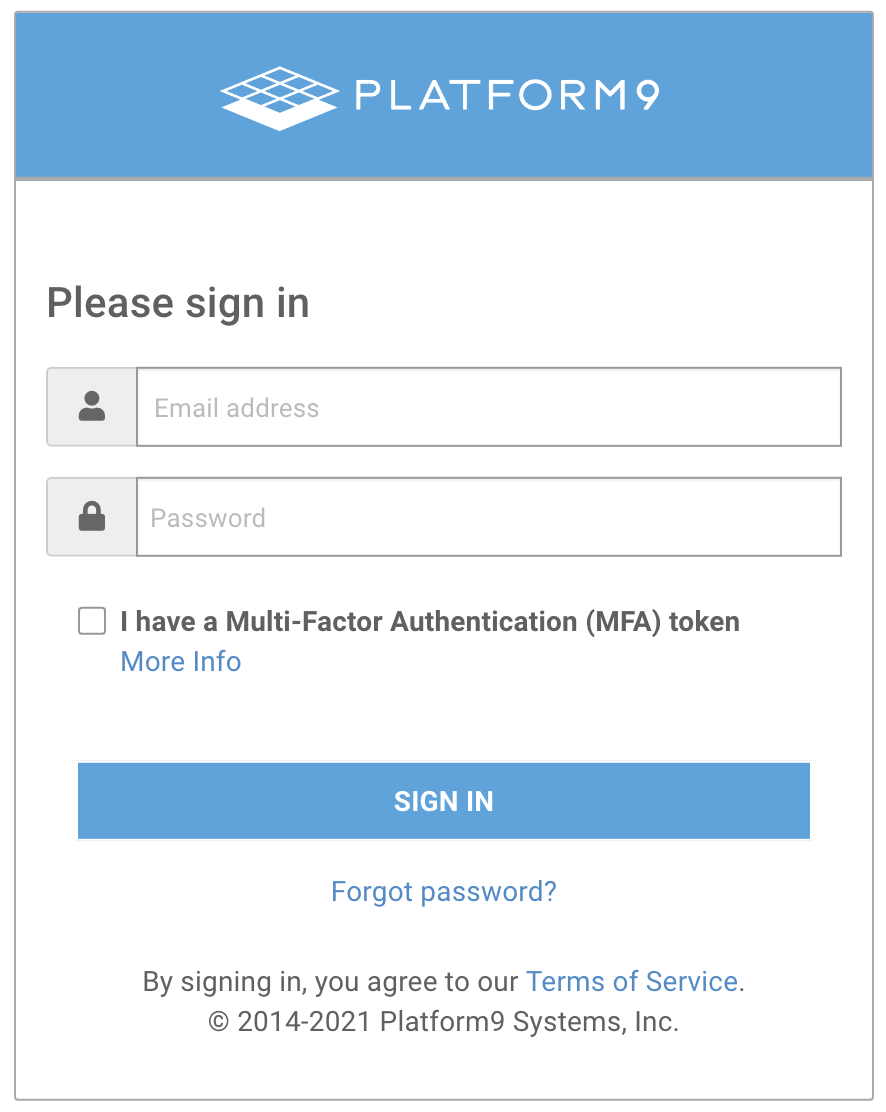
9. If you do not see any failed requests (aside from any HTTP 404s, which may or may not be relevant and unlikely to block page load in most cases), but, rather, you are experiencing slow load times where the page eventually loads – then, try sorting by "Time" instead, and see what took the longest.

It may be that a particular API is slow to respond. E.g., if you have a lot of security groups, it may take a while for the Neutron API to load all of these when navigating to the Networks > Security Groups tab.

<figure><img src="https://3182346597-files.gitbook.io/~/files/v0/b/gitbook-x-prod.appspot.com/o/spaces%2FQM0xDokARgDhhtesMRUM%2Fuploads%2Fgit-blob-37a2b0d2212801762d34ac13879fcedcfb24954b%2F1623345575.png?alt=media" alt="Screen_Shot_2021-02-12_at_3_00_12_PM.png"><figcaption><p>Screen_Shot_2021-02-12_at_3_00_12_PM.png</p></figcaption></figure>

In this case, please similarly share the request details with our Support team for further analysis.

**Note**: Please bear in mind that most APIs may already be tuned as finely as possible to provide the best performance. In some rare edge cases, a resize of the management plane instance may need to be performed, though – adjusting the API workers accordingly as per the increased # of vCPUs, etc.


---

# Agent Instructions
This documentation is published with GitBook. GitBook is the documentation platform designed so that both humans and AI agents can read, navigate, and reason over technical content effectively. Learn more at gitbook.com.

## Querying This Documentation
If you need additional information that is not directly available in this page, you can query the documentation by asking a question.

Perform an HTTP GET request on the following URL with the `ask` and `goal` query parameters:

```
GET https://platform9.com/kb/generic/frequently-asked-questions/troubleshooting-ui-failing-to-load-or-loading-slowly.md?ask=<question>&goal=<user_goal>
```

`ask` is the immediate question: it should be specific, self-contained, and written in natural language.
`goal` is what the user is ultimately trying to achieve, the reason they need the answer. Sharing it helps GitBook give you a better, more relevant answer. A goal is most helpful when it describes the outcome the user wants rather than restating the question. For example, with `ask=how do I create an API token`, a goal like `automate deployments from our CI pipeline` lets GitBook tailor the answer to that use case.

The response will contain a direct answer to the question and relevant excerpts and sources from the documentation.

Use this mechanism when the answer is not explicitly present in the current page, you need clarification or additional context, or you want to retrieve related documentation sections.